Herems 安装部署
Hermes 安装部署教程
Hermes 安装教程
安装命令
curl -fsSL https://raw.githubusercontent.com/NousResearch/hermes-agent/main/scripts/install.sh | bash然后耐心等待即可。
How would you like to set up Hermes ?

-> Quick setup - provider, model & messaging (recommended)
   Full setup - configure everything
这里我们选择推荐的即可。
- 下一步选择
More providers - 选择你有的模型提供的厂商,这里我选择的是
Z.AI / GLM (Zhipu AI direct API) - 输入智谱的
api key - 输入对应的官方文档里对应的
BASE_URL:https://open.bigmodel.cn/api/coding/paas/v4 - 下面选择模型
glm-5.1 - 下面就要你配置对应的消息渠道,即
openclaw里面的channel,也就是说类似的tg和飞书以及别的一些渠道
配置飞书
添加飞书机器人以及配置相应的权限的什么的应该不用演示了,基本openclaw经历过的都能配置了。也有简单的,下面会有一个方法会让你扫码登录快捷创建机器人。
hermes gateway setup

┌─────────────────────────────────────────────────────────┐
│             ⚕ Gateway Setup                            │
├─────────────────────────────────────────────────────────┤
│  Configure messaging platforms and the gateway service. │
│  Press Ctrl+C at any time to exit.                     │
└─────────────────────────────────────────────────────────┘

  Gateway service is not installed yet.
  You'll be offered to install it after configuring platforms.


◆ Messaging Platforms


  ─── 🪽 Feishu / Lark Setup ───


    Go to https://open.feishu.cn/ (or https://open.larksuite.com/ for Lark)
    Create an app, enable the Bot capability, and copy the credentials.

  App ID: xxxxxx
  App Secret:
    Skipped (keeping current)

⚠   Could not verify bot connection. Credentials saved anyway.

    Skipped (keeping current)


    Skipped (keeping current)

✓   DM pairing enabled.
    Unknown users can request access; approve with `hermes pairing approve`.

    Skipped (keeping current)

    Group chats enabled (bot must be @mentioned).

  Home chat ID (optional, for cron/notifications): xxxxxxxx
✓   Home channel set to xxxxxx

✓ 🪽 Feishu / Lark configured!
    App ID: xxxxxx
    Domain: feishu


◆ Messaging Platforms
    Skipped (keeping current)


──────────────────────────────────────────────────────────

  Install the gateway as a launchd service? (runs in background, starts on boot) [Y/n]: Y
Installing launchd service to: /Users/wxvirus/Library/LaunchAgents/ai.hermes.gateway.plist

✓ Service installed and loaded!

Next steps:
  hermes gateway status             # Check status
  tail -f ~/.hermes/logs/gateway.log  # View logs

  Start the service now? [Y/n]: Y
✓ Service started
测试
有的人再配置完成上述内容之后有一个提示Launch hermes chat now [Y/n],你可能选了Y,然后就崩溃了,这是一个已有人报过的 Hermes CLI / prompt_toolkit 交互式输入兼容问题,核心触发条件通常是 stdin 不是一个真正的 TTY,比如从脚本里拉起、某些 IDE 终端、重定向输入、setup 结束后自动续跑 chat 等场景。官方 issue 里最近也有人复现到和你几乎一致的栈。
只需要改成手动重新打开一次,或者直接hermes
hermes chat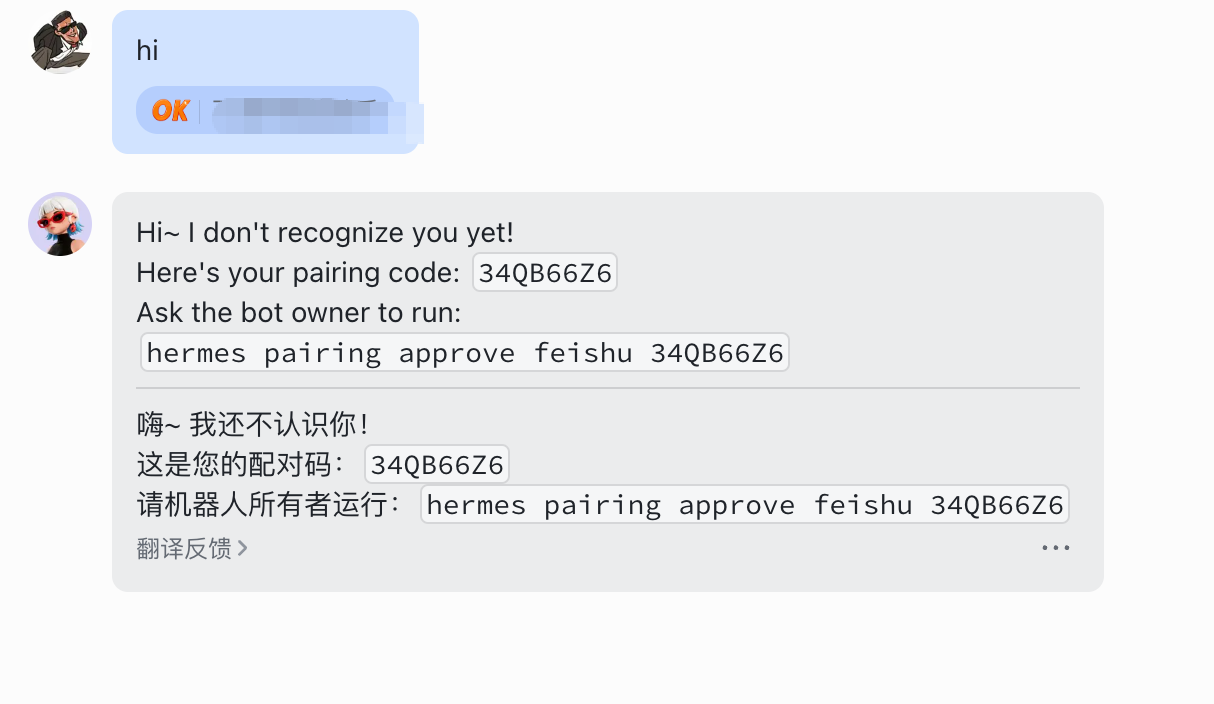 点击放大
点击放大
hermes pairing approve feishu 34QB66Z6

  Approved! User xxxx on feishu can now use the bot~
They'll be recognized automatically on their next message.然后下面就可以愉快的和hermes玩耍了。
测试使用定时任务
 点击放大
点击放大